Equine Management

Every horse in your care, with everything that goes with it. Health records, insurance, emergency contacts, registries, and files live on each horse's profile, and HayNet creates a renewal task and sends a reminder before a Coggins or a policy lapses.

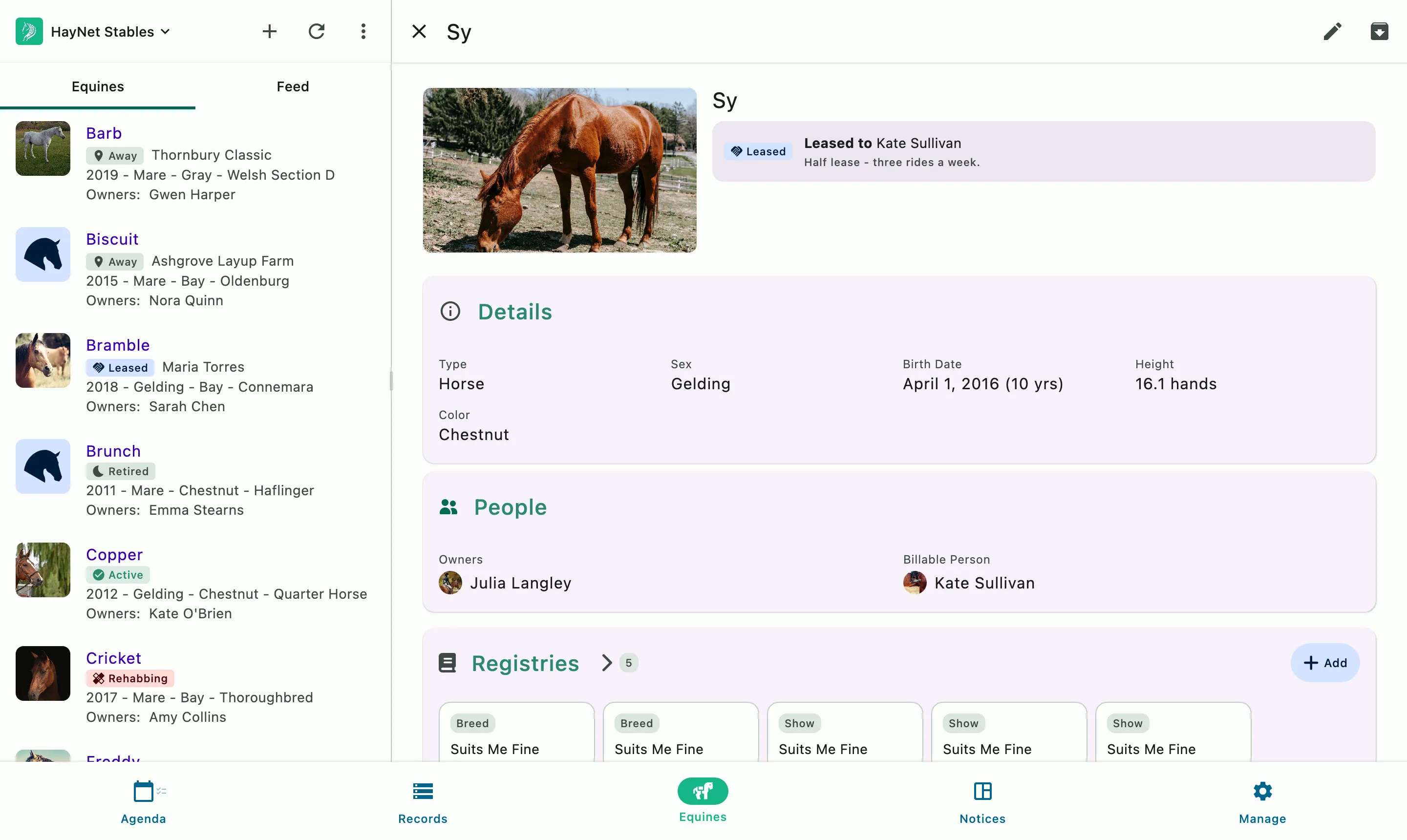
The horse list beside a horse's profile: details, owners, and registries

Horse profiles

Comprehensive horse profiles that keep everything organized

The profile

Barn name, registered name, age, color, markings, and height in hands, inches, or centimeters. Breed and competition registry info, pedigree data, files, and notes are all on the profile too. A status shows where the horse stands today, whether it's active, away at a show, on trial, rehabbing, or retired.

The people

Owners, lessees, and the billable person are on the profile, so charges for the horse go to the right account. Owners can keep their own horse's profile up to date, and a lessee can see the horse and book on it.

The feed program

Every horse's feed schedule belongs to its profile, alongside its health records and insurance. Staff open it from the horse in a tap, and the same schedule goes into the horse's report when it travels.

Owners and lessees see their own horses, and your staff see the barn's horses as their roles allow.

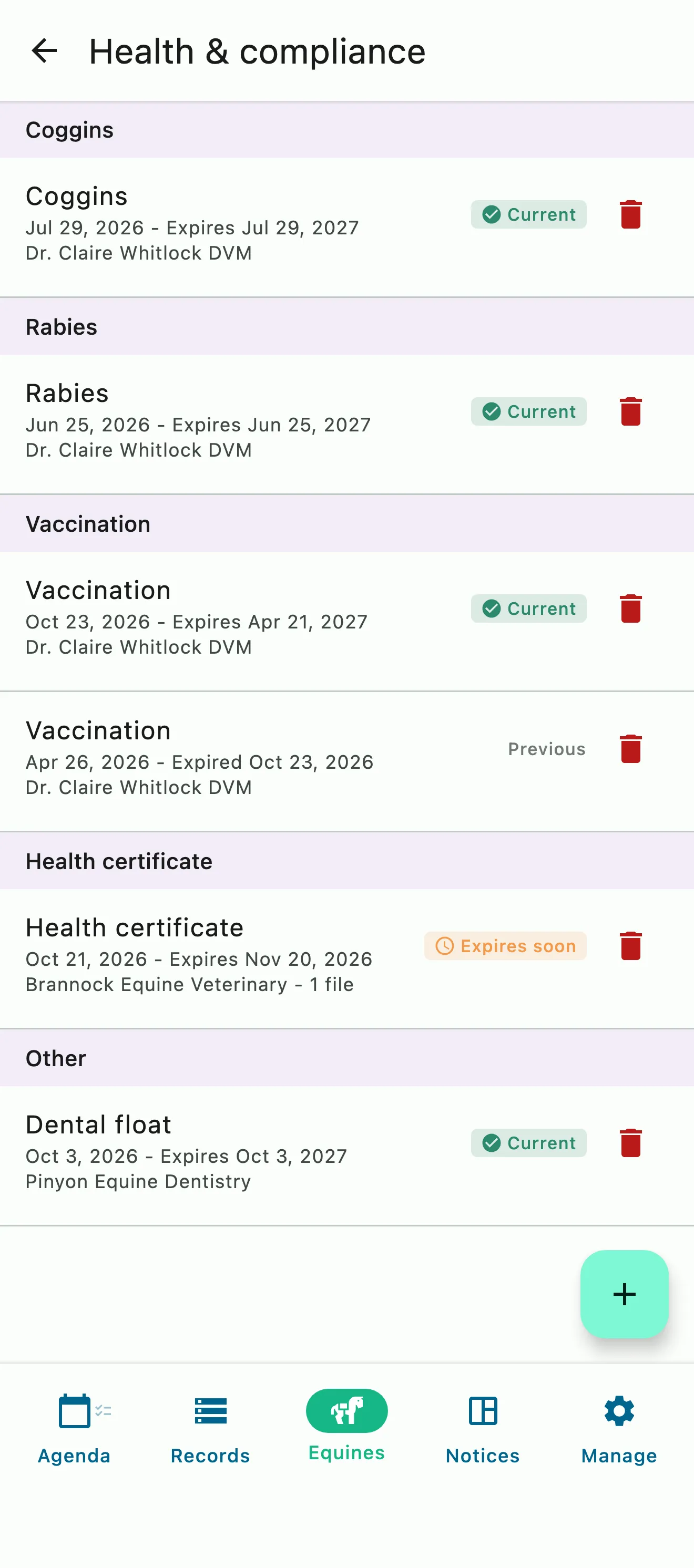
A horse's Coggins, rabies, vaccination, health certificate, and dental records, each with its vet and expiry date

Health records

A reminder well before the next Coggins expires

Keep Coggins tests, rabies and other vaccinations, health certificates, and any other record, like a dental exam, on the horse it belongs to, each with its date, expiry, provider, notes, and files. If no expiry date is entered, HayNet suggests a typical one for each record type, and creates a renewal task well before the record expires. Logging the new record completes the task.

  • Coggins, rabies, vaccinations, health certificates, and your own record types
  • A typical expiry date suggested when none is entered, and always adjustable
  • Renewal tasks five weeks ahead by default, adjustable for the barn or a single record
  • A reminder when the task opens and a final reminder a week before expiry
  • The current record up front, with earlier ones kept as history
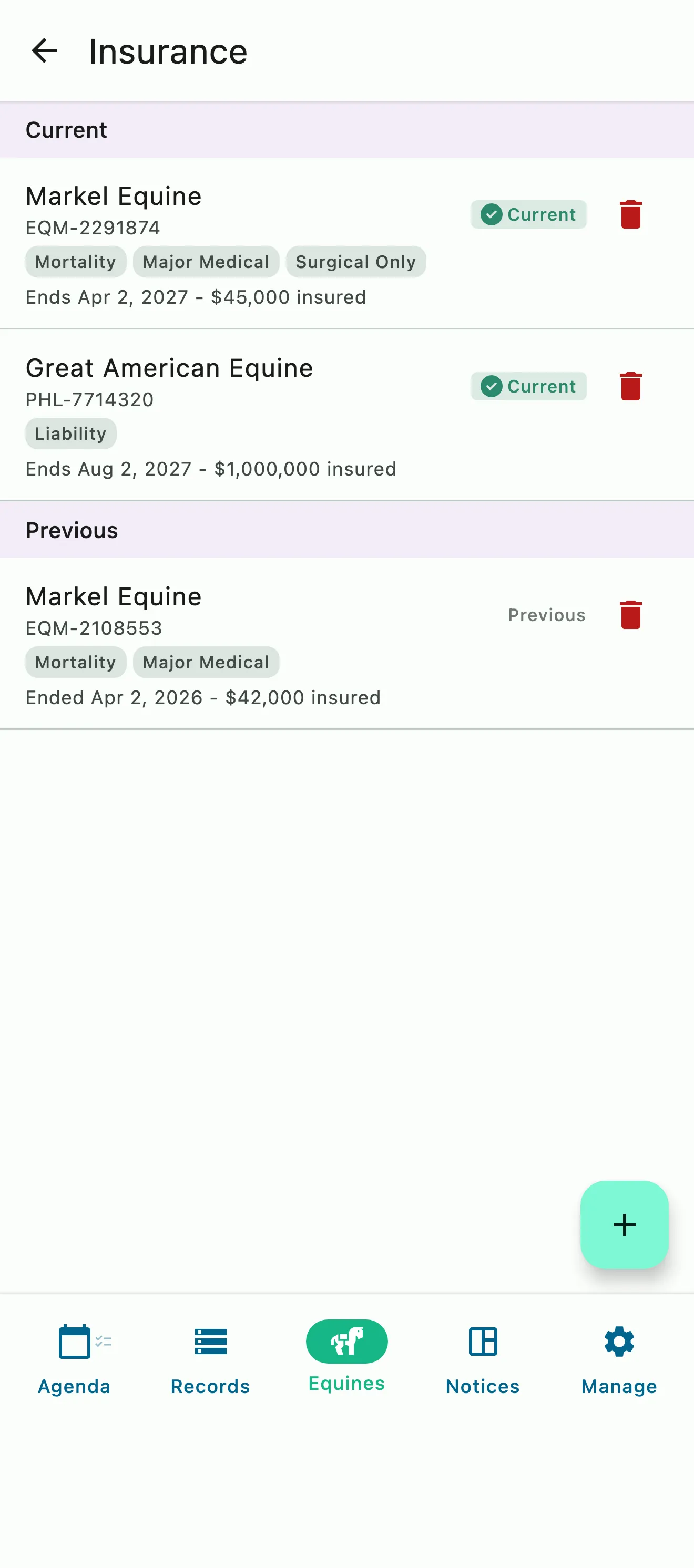
A horse's current and previous insurance policies with coverage, insured value, and end dates

Insurance

Renewals and premiums that don't slip by

Each policy lives on the horse it covers, with the insurer, policy number, coverage, insured value, cover dates, premium schedule, and the policy documents. HayNet creates a renewal task ahead of the renewal date and adds a vet exam to it when the insurer needs a certificate. A premium task arrives a week before each payment is due, and completing it rolls the next date forward.

  • Mortality, major medical, loss of use, liability, colic surgery, or your own coverage
  • Renewal tasks five weeks ahead by default, with a final reminder a week before
  • A vet exam added to the renewal when the policy requires a certificate
  • Visibility and access to horses are based on roles and stakeholder status
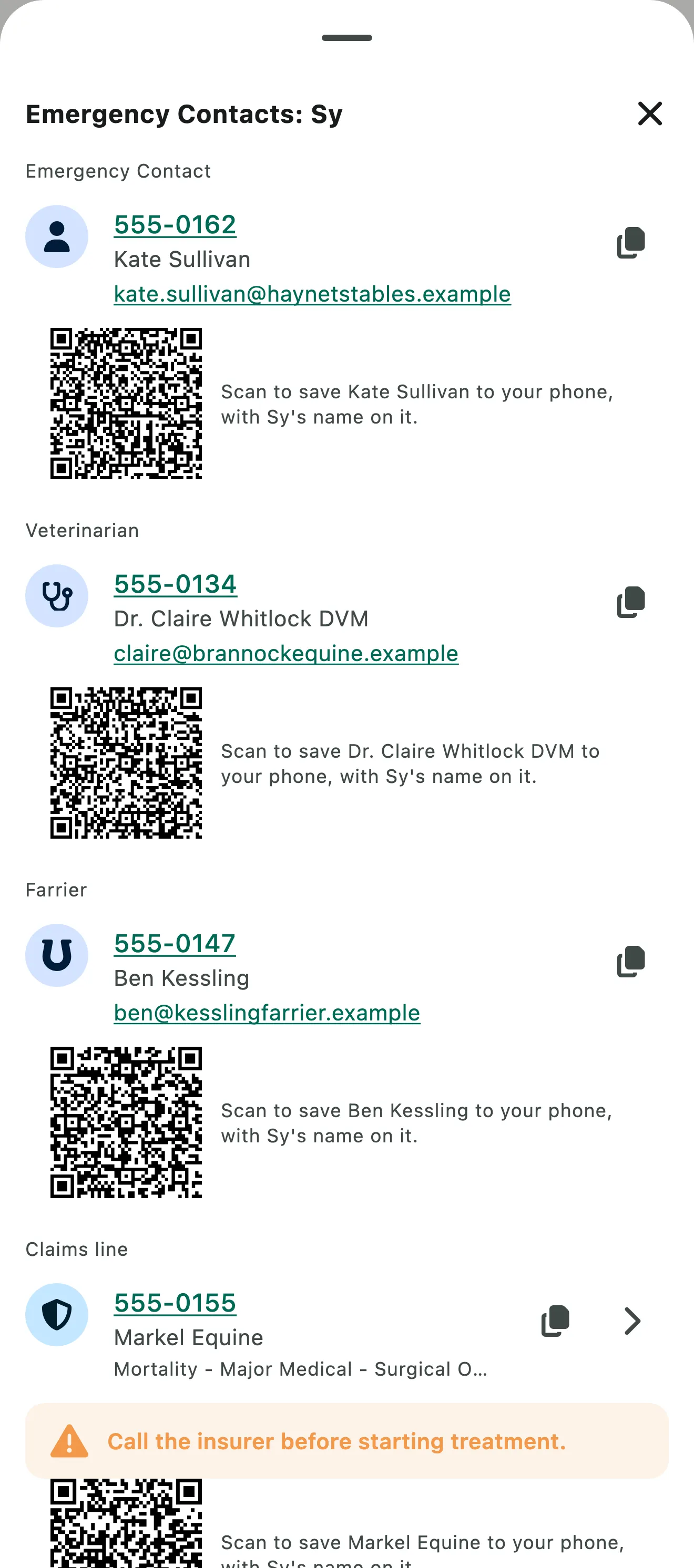
A horse's emergency contact, vet, and farrier, each with a phone number, an email, and a QR code that saves the contact to a phone

Emergency contacts

The right number, the moment you need it

Every horse carries its own emergency contact, vet, and farrier, each with a phone number and email. One tap opens a horse's contacts, ready to call, email, or copy, and each contact has a QR code that saves it to your phone with the horse's name on it. For the people who manage the policy, the insurer's claims line and any rule to call before treatment appear right beside them.

  • Emergency, vet, and farrier contacts on every horse
  • Pick a contact from your barn's members or add a new one
  • Tap to call, email, or copy
  • A QR code that saves the contact with the horse's name
  • The owner is the default emergency contact when no contact is on file
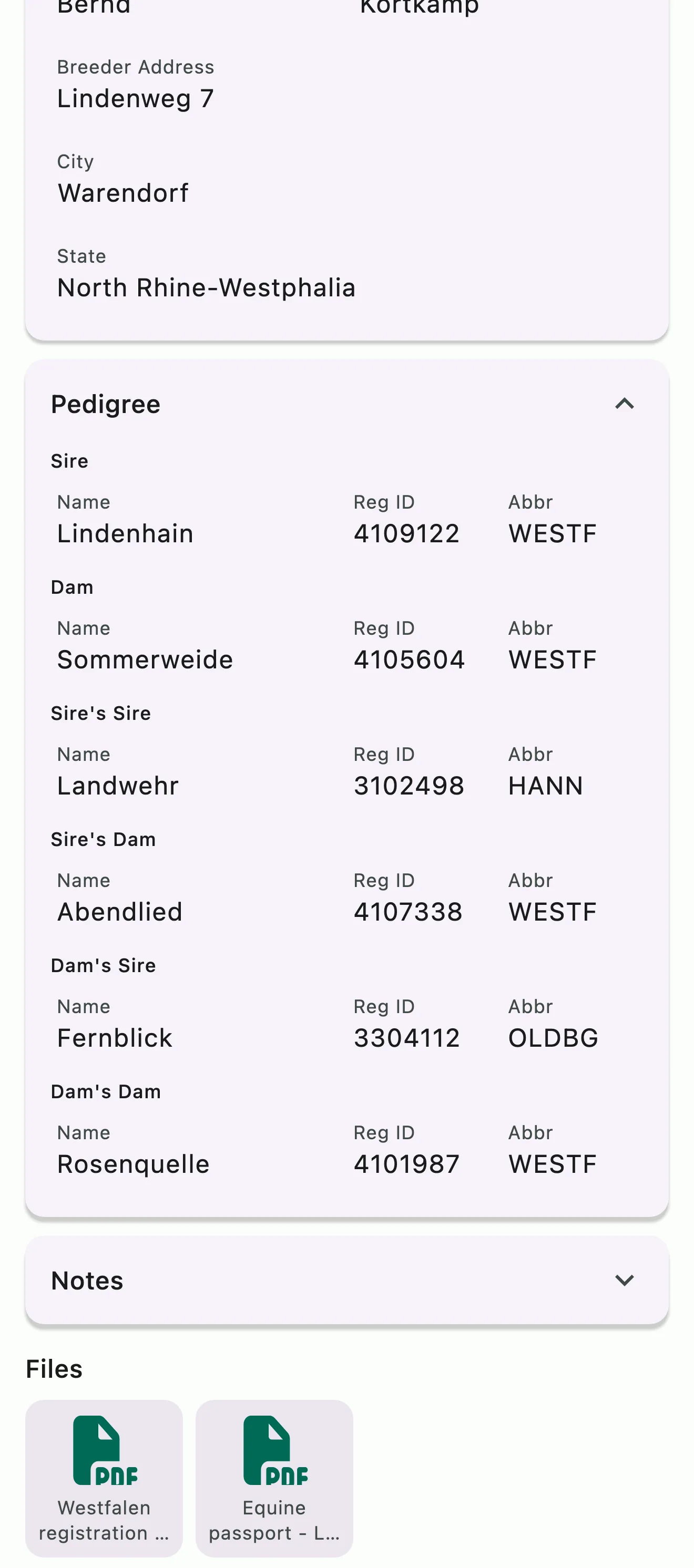
A breed registry entry with the breeder's address and a three-generation pedigree, each ancestor with its registration number
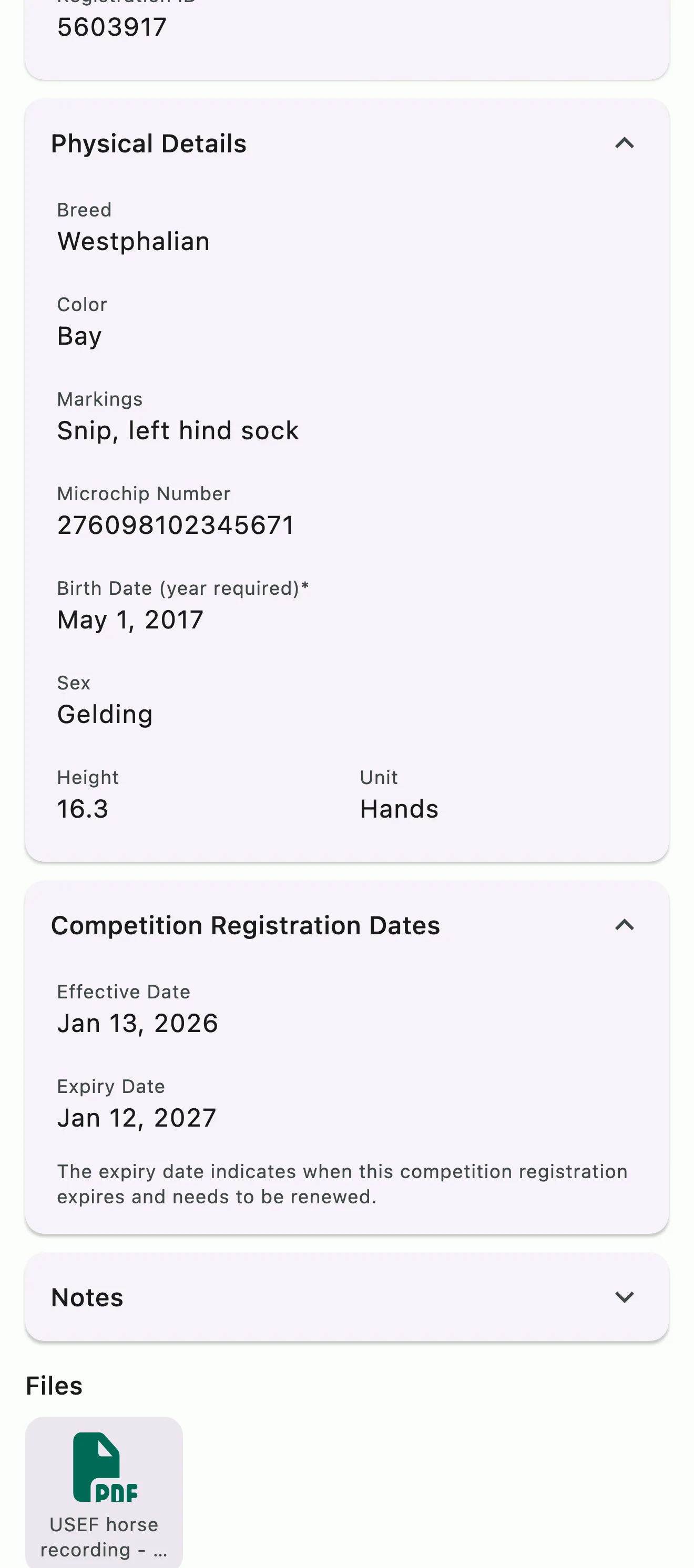
A competition registry with the horse's microchip number and the membership's effective and expiry dates

Registries and pedigree

Every registration, number, and expiry date on the horse

Add as many breed and competition registries as a horse needs, from USEF, FEI, and USDF to AQHA, the Jockey Club, and KWPN, or type in any association that isn't listed. Each entry holds the registered name, registration ID, and microchip number, with the registration papers attached. Competition registries carry their effective and expiry dates, and breed registries hold the breeder's details and a three-generation pedigree.

  • Breed and show or competition registries, as many as the horse needs
  • Registration IDs, microchip, passport, and association numbers in one place
  • Effective and expiry dates on competition registries
  • A three-generation pedigree with the breeder's details
  • Attach registration papers to the entry
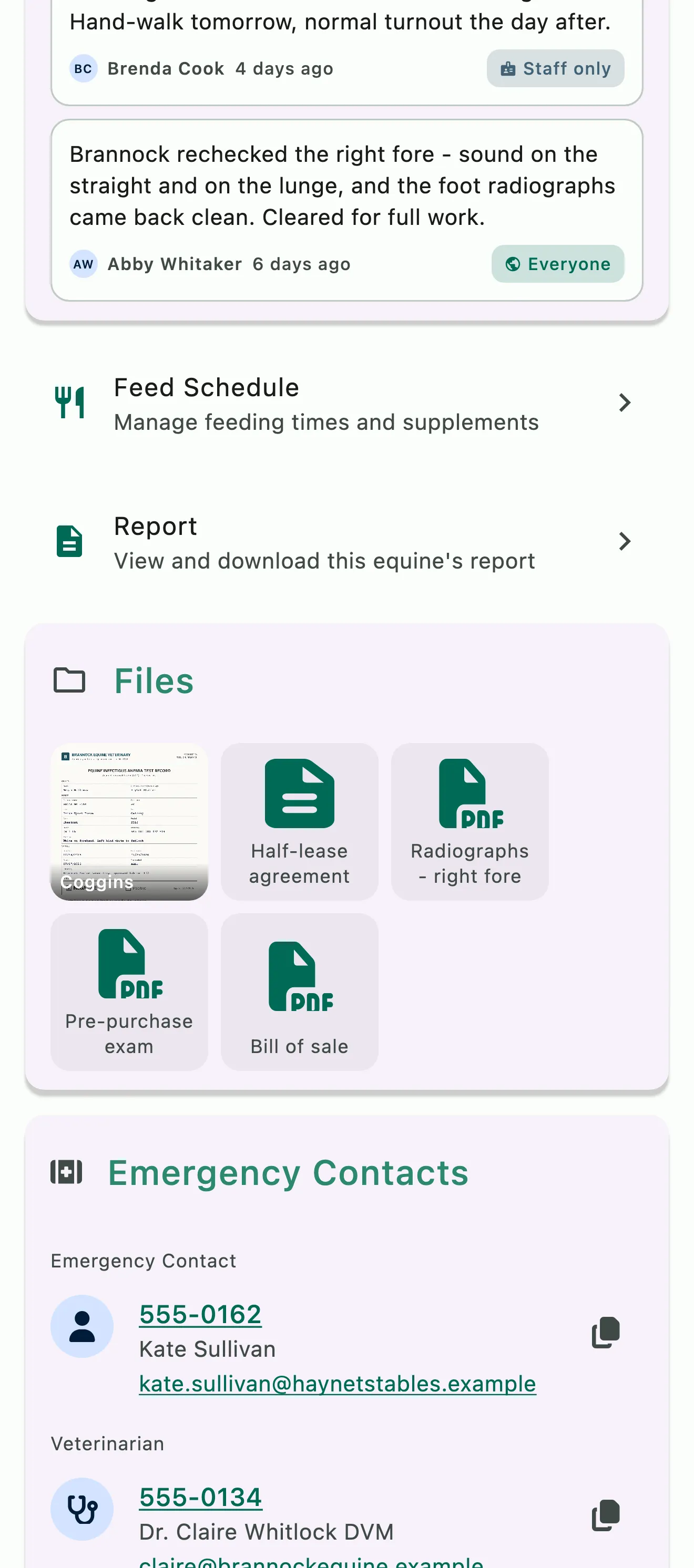
Notes on a horse's profile, each marked with who can read it, above the horse's files: a Coggins, a half-lease agreement, radiographs, a pre-purchase exam, and a bill of sale
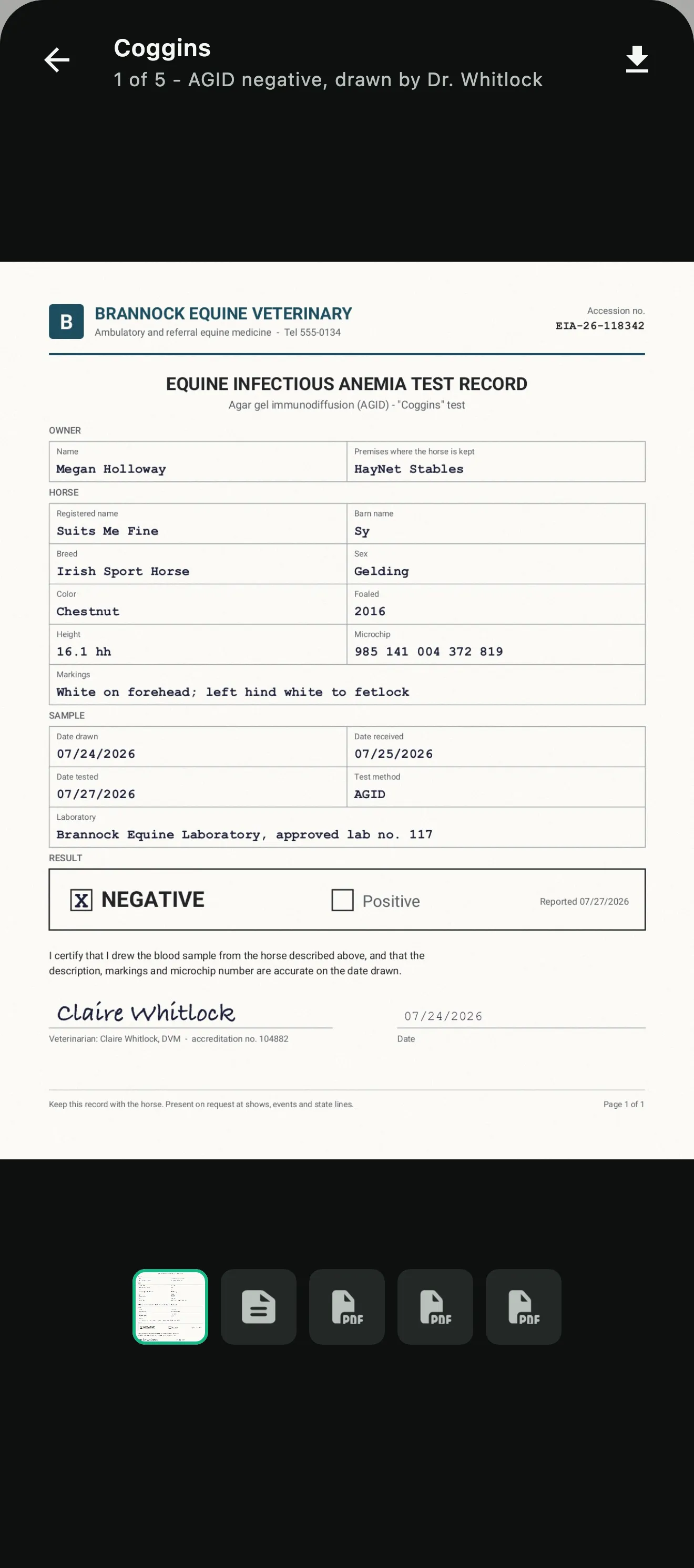
A negative Coggins test record open full screen on a phone, with the horse's other files along the bottom

Files and notes

The paperwork stays with the horse

Attach Coggins results, radiographs, lease agreements, bills of sale, and pre-purchase exams to the horse's profile, or to the health record, policy, registry entry, or note they belong to. When the show staff asks for a negative Coggins or the farrier wants to see last week's radiographs, they're on your phone. Notes keep vet visits, farrier work, and progress on the horse, and each one can be shared with everyone, with staff only, or kept to yourself.

  • Files on the profile, health records, insurance policies, registries, and notes
  • A title and description on every file
  • Notes linked to the horse, its records, its policies, and its events
  • Each note shared with everyone, staff only, or just you
  • Searchable notes linked to horses
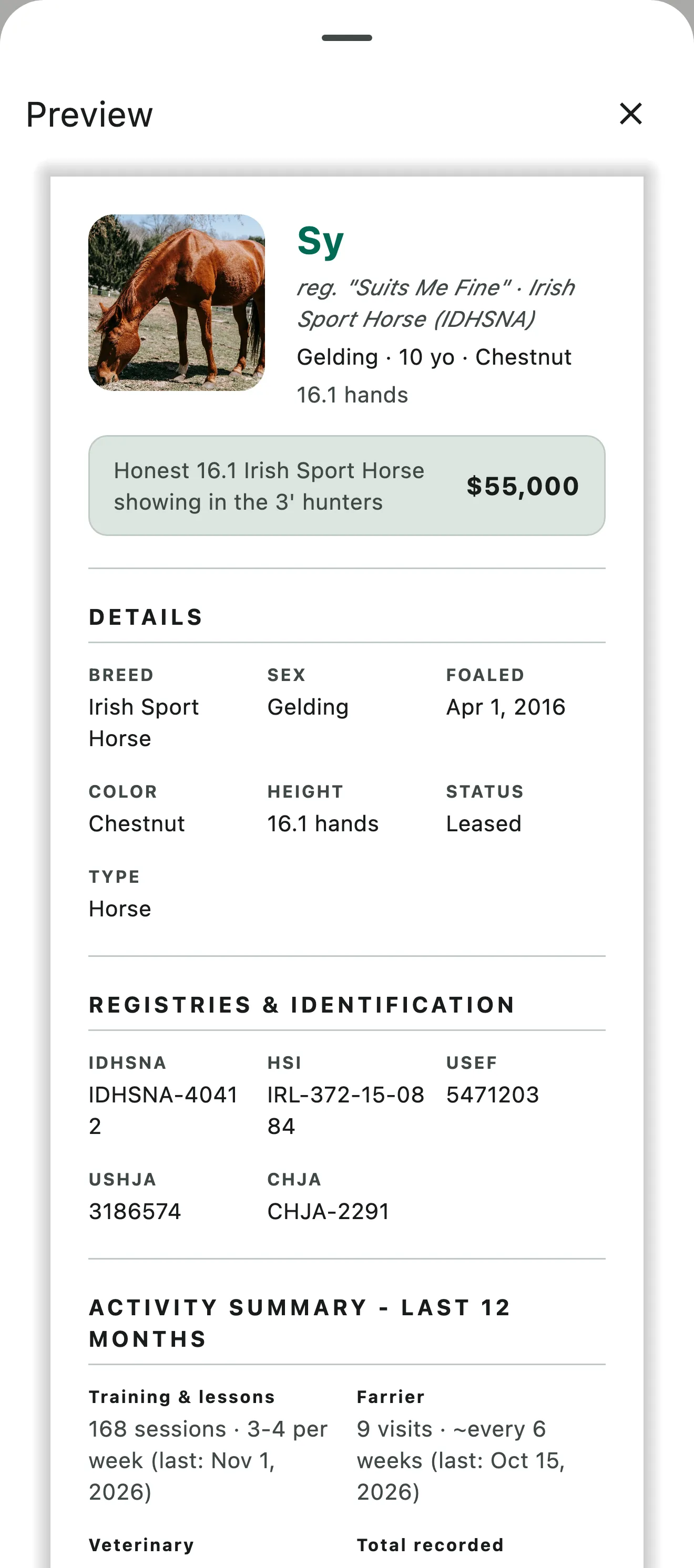
A sales flyer built from a horse's profile, with a photo, a headline and asking price, the horse's details, and registration numbers
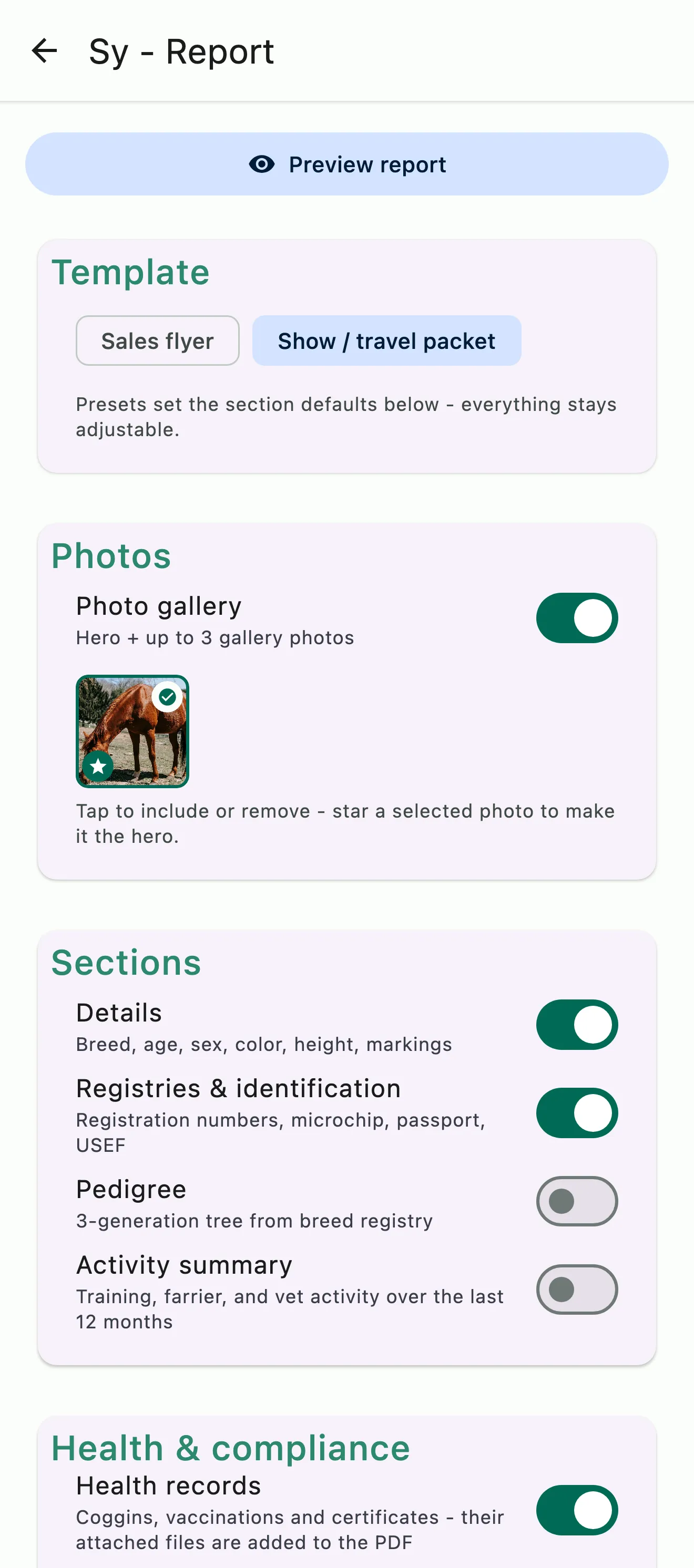
Building a horse report: the Sales flyer and Show / travel packet templates, the photo gallery, and a switch for each section

Horse reports

The whole horse, in one PDF

Build a report from everything on the profile and choose what goes in it. The Sales flyer preset leads with a headline, the asking price, and photos. The Show / travel packet carries the registries, contacts, feeding schedule, and health records, with their files attached, for the show staff and anyone traveling with the horse. Every section stays adjustable, so the same report works as an update for an owner or partner.

  • Sales flyer and Show / travel packet presets, fully adjustable
  • Details, registries, pedigree, contacts, feeding schedule, and health records
  • A summary of the past year's training, farrier, and vet activity
  • Download, print, share, or email it to yourself

Common questions

About horses in HayNet

Who can see and edit a horse's profile?

It depends on each person's role and their connection to the horse. Admins, managers, grooms, and stable hands can add and edit any horse at your barn, and trainers can see every horse without editing it. A horse's owners can see and update its profile, a lessee can see the horse and book on it, and the person billed for the horse can see it. Parents can also see their children's horses, and clients don't see horses they aren't connected to.

Insurance details are visible only to people who can edit the horse, and feed schedules stay with your staff.

Can I upload Coggins files, health certificates, and other records for horses?

Yes. Each horse's profile has a Health records section for Coggins tests, rabies and other vaccinations, health certificates and any other record, each with its date, expiry, vet or provider, notes and the files themselves. HayNet can also create a renewal task ahead of a record's expiry, so a renewal reminder goes out before the next Coggins lapses.

The profile has its own Files section for x-rays and other documents, and each registry entry takes its own files, like registration papers and show records.

How do I log a vet or farrier visit?

Open the horse from the Equines tab. For Coggins, vaccinations, health certificates and other vet records, add a health record: choose the type, or Other with your own label, like a dental exam, then the date, the vet or provider, notes and any files. For farrier work and routine visits, add a note on the horse, so its vet visits, farrier work and progress sit together in one place.

If the visit is on the schedule as an event with the horse on it, it also becomes part of the horse's historical record once the event is finalized.

Am I able to store my horse's competition registry numbers (USEF, FEI, NRHA, NCHA, etc.) or breed registry and pedigree data?

Yes. Each horse's profile has a Registries section that holds several entries, each a Breed Registry or a Show/Competition Registry. Pick the association from the list, like USEF, FEI or NRHA, or type any name that isn't listed, then add the registered name, the registration ID and, on a competition entry, its effective and expiry dates.

Breed entries hold the breeder's details, from farm name to country of birth, and the pedigree: Sire, Dam, Sire's Sire, Sire's Dam, Dam's Sire and Dam's Dam. Once an entry is saved, attach its registration papers and certificates to it.

Can I keep feed and supplement instructions per horse?

Yes. Each horse has its own feed schedule on the Feed tab (Equines › Feed), which only staff see. A schedule is a set of feeding times, like AM Feed, each with its hay, grain and supplements. Every line carries a Quantity, the standardized serving size you use for cost and inventory, and a Practical Amount, the way your staff actually scoop it, like two red scoops, plus notes such as soak 10 minutes.

Pack, bag and container units count pre-portioned supplements and bagged feed by the piece, and grooms and stable hands mark each line Done on the day's feed list.

How do I generate a horse report?

Open the horse's profile and tap Report. Pick a preset, Sales flyer or Show / travel packet, then choose what to include. Every section is optional: details, registries and identification, pedigree, a summary of the past year's activity, feeding schedule, contacts, documents on file, health records, notes, and photos. The Sales flyer adds a headline, the asking price, and who to contact.

Select the files to attach, like the Coggins certificate itself or a copy of the breed registry papers, and they go into the PDF with the report. Preview the report, then download it as a PDF, print it, share it, or email it to yourself.

See the full FAQ

Every horse, every detail, one place.

No card required. Available on Apple iOS, Android and Web.